Live in the App Store · 5.0 ★
iOS Paid SaaS Event Tech Shipped solo

Meashrim in Click — a real, paid product I shipped end-to-end

A live iOS app for event RSVP & seating. I characterized, designed, built and launched it on my own — and today real customers pay a subscription.
Role
Founder · End-to-End Product
Platform
iOS app + web admin
Status
Live & monetized
Timeline
2024 – present
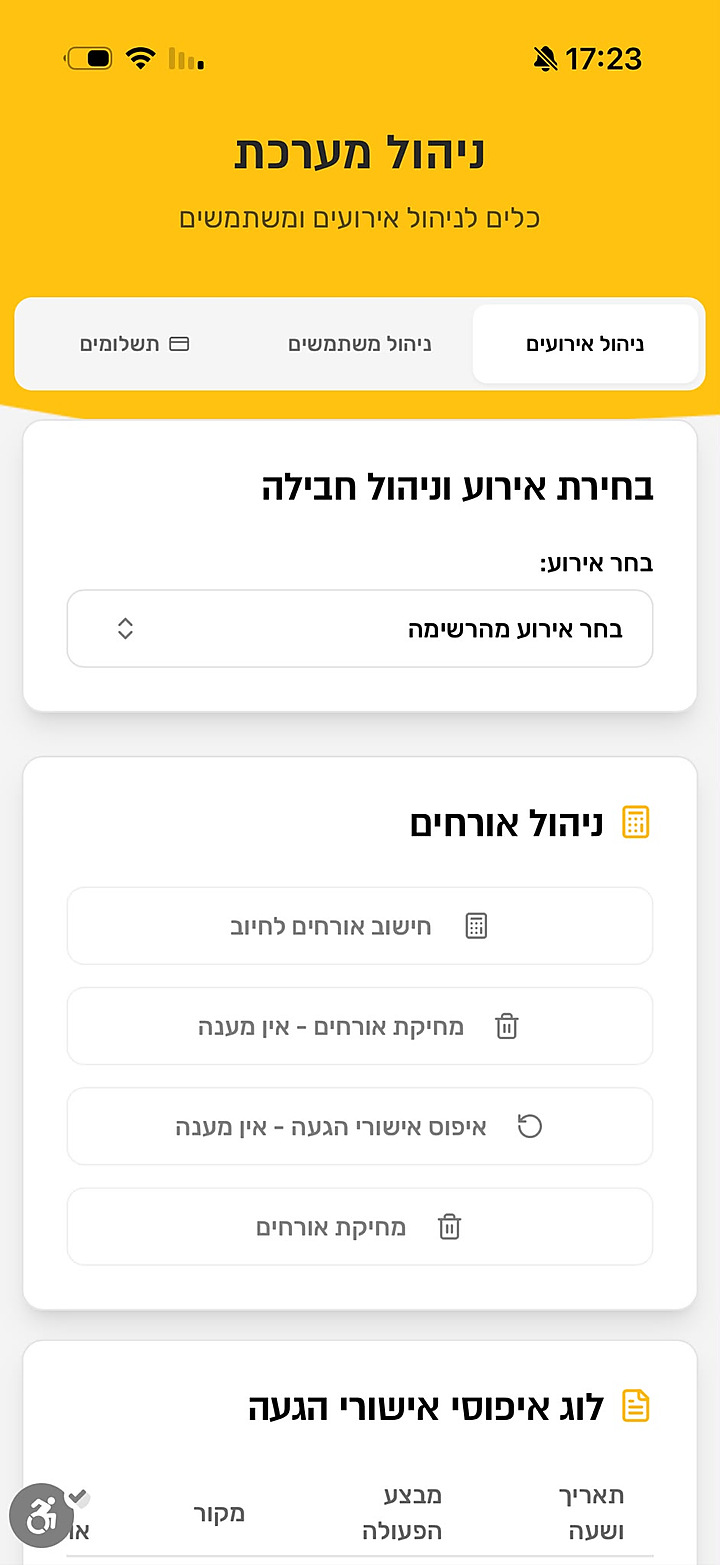
Meashrim in Click admin system
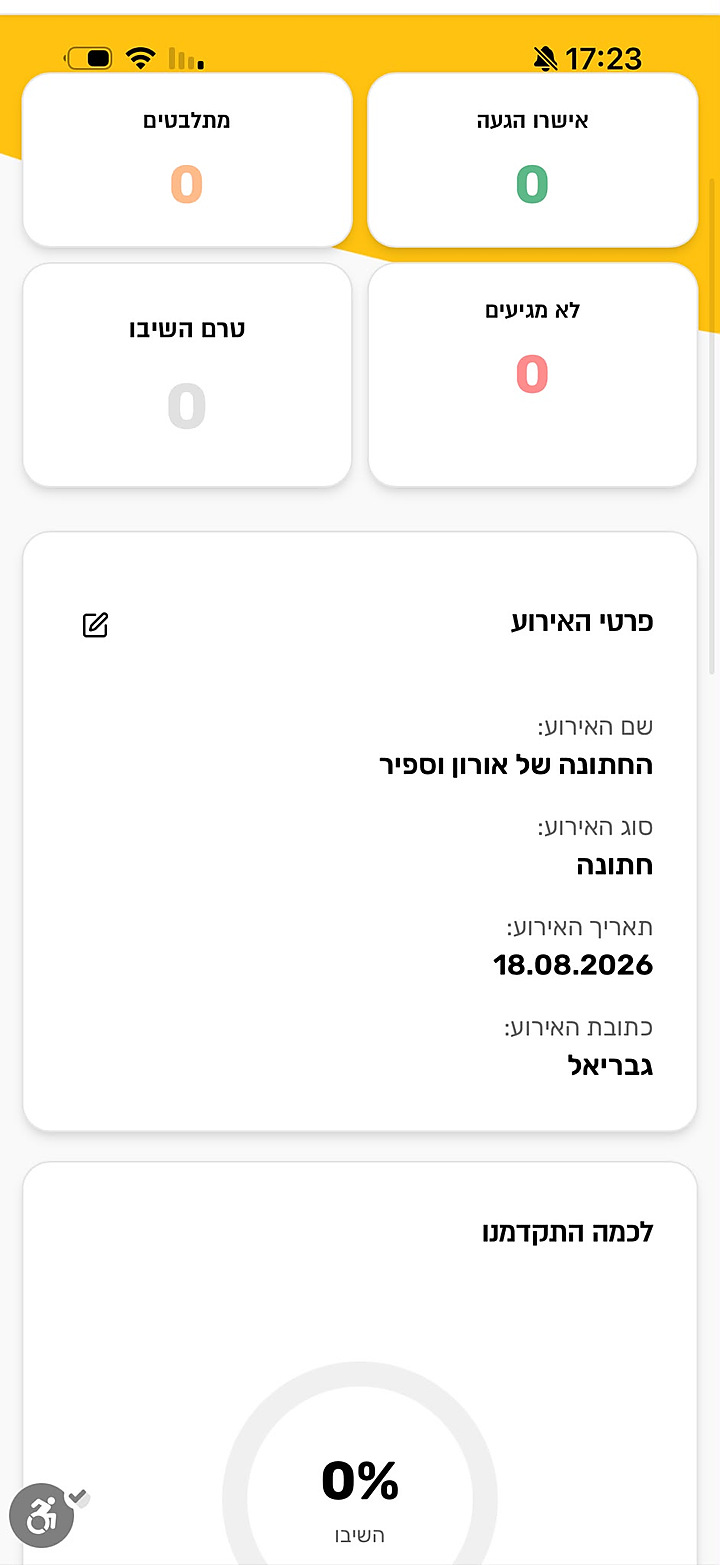
Meashrim in Click event dashboard with RSVP stats
486
Registered users
5.0 ★
App Store rating
Paid
Subscription customers
Solo
Characterized · built · shipped

The problem — and the whole purpose

For a couple, everything is scattered across suppliers

Planning a wedding, a couple juggles a different supplier for every piece — RSVP calls, seating, gifting — plus their own WhatsApp groups and spreadsheets. Nothing talks to anything else.

The entire purpose of Meashrim in Click: bring every piece into one simple, clear system — so the couple stays in control of their own event.

Scattered — a supplier for everything
  • One supplier for RSVP calls, another for seating, another for gifts
  • Guest replies lost across WhatsApp groups and spreadsheets
  • Seating rebuilt by hand every time someone answers
  • No single, live view of where the event actually stands
One house — Meashrim in Click
  • RSVP, seating and gifting in one system
  • One shareable link — guests confirm in a single tap
  • Live dashboard: confirmed, undecided, not-coming, no-reply
  • Seating and billable-guest counts update automatically

Market research

What the market survey revealed

I surveyed seven RSVP providers across 2024. Rather than reprint the table, here's what it actually told me — and where the opening was.

~₪1.8
Average price per guest record for RSVP collection (range ₪0.9–2.32).
₪1,500–2,300
Seating sold separately, as a human service — per event.
Per-message
Everyone bills per record / per blast, event by event.
What the market includes

RSVP collection only — rounds of WhatsApp messages and phone calls, SMS reminders and a thank-you. Some add credit-card gifting. Seating is a separate, pricey human service, and it's all billed by the guest record.

What we give — one house
  • Arrival approvals (אישורי הגעה) — RSVP collection & live tracking
  • Seating (סידורי הושבה) — built in, not a separate service
  • Credit-card gifting (מתנות באשראי)
  • All self-serve, one subscription, one place
Go-to-market pricing

I launched with a deliberately low entry (penetration) price — set below the per-record market — to pull customers away from the incumbents and build a base fast, then grow value from there.

What competitors don't have — that we do
  • Built-in seating (theirs is a separate ₪1,500–2,300 service)
  • One product bundling RSVP + seating + gifting
  • A flat subscription instead of per-message billing
  • Self-serve control — live dashboard, auto-seating, no middleman

How I approached it

A strategist's cross-view, not a pretty screen

I read the market, characterized the product, defined what to build for the user — then connected the three by solving the real problem. That's product & project management, end to end.

Coming from advertising and project management, I didn't start from a UI — I started from the business and the behavior: who the host is, what decision they're stuck on, and the one thing the product has to nail.

Characterization → product

What I specced and shipped

The spec turned into a focused product with a clear job: give the host total control of arrivals, seating and money — in one place.

Real-time RSVP dashboard
Confirmed, undecided, not-coming and no-reply — with a live “how far along are we” progress ring.
Automatic seating
Seating and billable-guest counts recalculate as replies come in — no more manual spreadsheet rebuilds.
Suppliers & payments
Track vendors and payment status alongside the guest list, so the budget and the event stay in sync.
Multi-event admin
A back-office that manages events, users, suppliers and subscriptions — the system behind the product.
Smart reminders
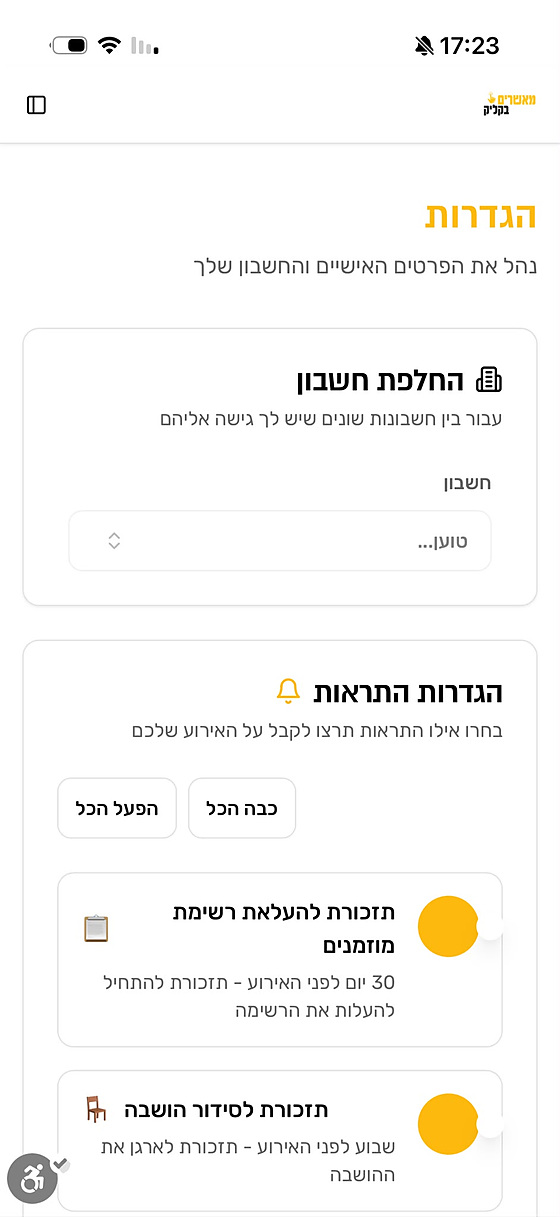
Timed nudges — upload the guest list 30 days out, organize seating a week before — so nothing slips.
One-tap approval link
A shareable link lets guests confirm without installing anything — the lowest-friction path to a reply.
Deep-dive: the seating system, fully characterized
One feature, specced end-to-end before a single screen was designed — a sample of the characterization work behind the product.
  • Create tables by type (round / square / knights) with seats per table
  • Live table list with fill status — full, partial, empty — edit & duplicate
  • Guest panel grouped by RSVP status: coming, undecided, not-coming, no-reply
  • Search by name or phone; assign by tap or drag
  • One-tap auto-seating by family into shared tables by availability
  • Two-way sync between a seat and each guest's “table number” field
  • Day-of “arrived” check-in per guest
  • PDF / Excel export, plus a venue-sketch upload so we plan seating without bugging the client

The product, live

Real screens from the shipped app

Not mockups — these are screens from the product that's in the App Store today.

Event dashboard showing RSVP stats and progress
Event dashboard
The host's home base — arrivals at a glance, event details, and a live response progress ring.
Admin system for events, users and suppliers
Admin system
The back-office running events, guest tools and billable-guest calculations across the whole user base.
Settings and reminder configuration
Reminders & settings
Account switching and the timed reminders that keep hosts on track before the event.

On the desktop

The web console — where the event is run

Beyond the app, hosts and our team manage everything from a full web console: the live dashboard, guest list and seating board. (Guest details are blurred here for privacy.)

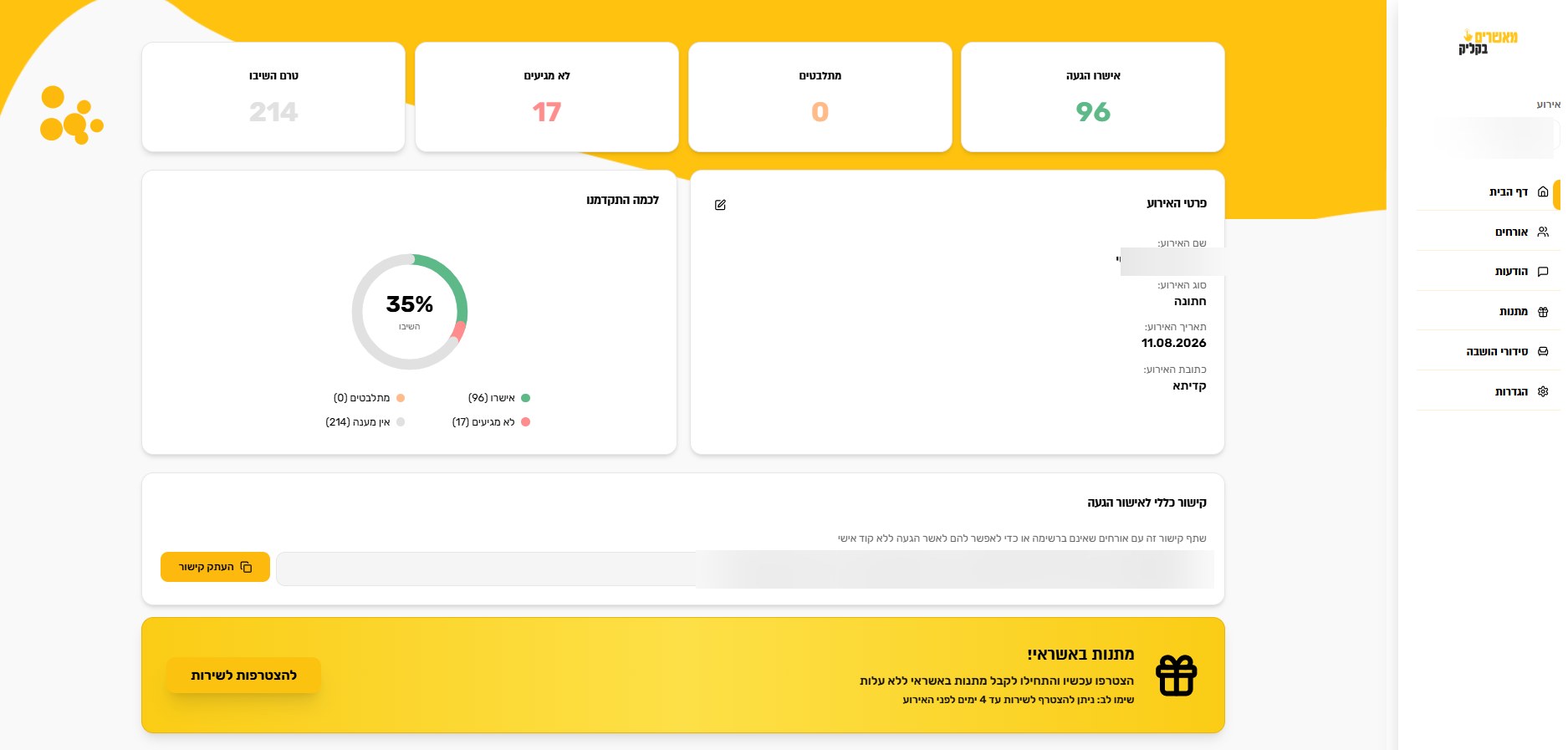
Meashrim in Click web dashboard with RSVP stats
Event dashboard
Live RSVP breakdown — 96 confirmed, 17 not coming, 214 pending — a response-rate ring, event details, and a shareable general RSVP link.
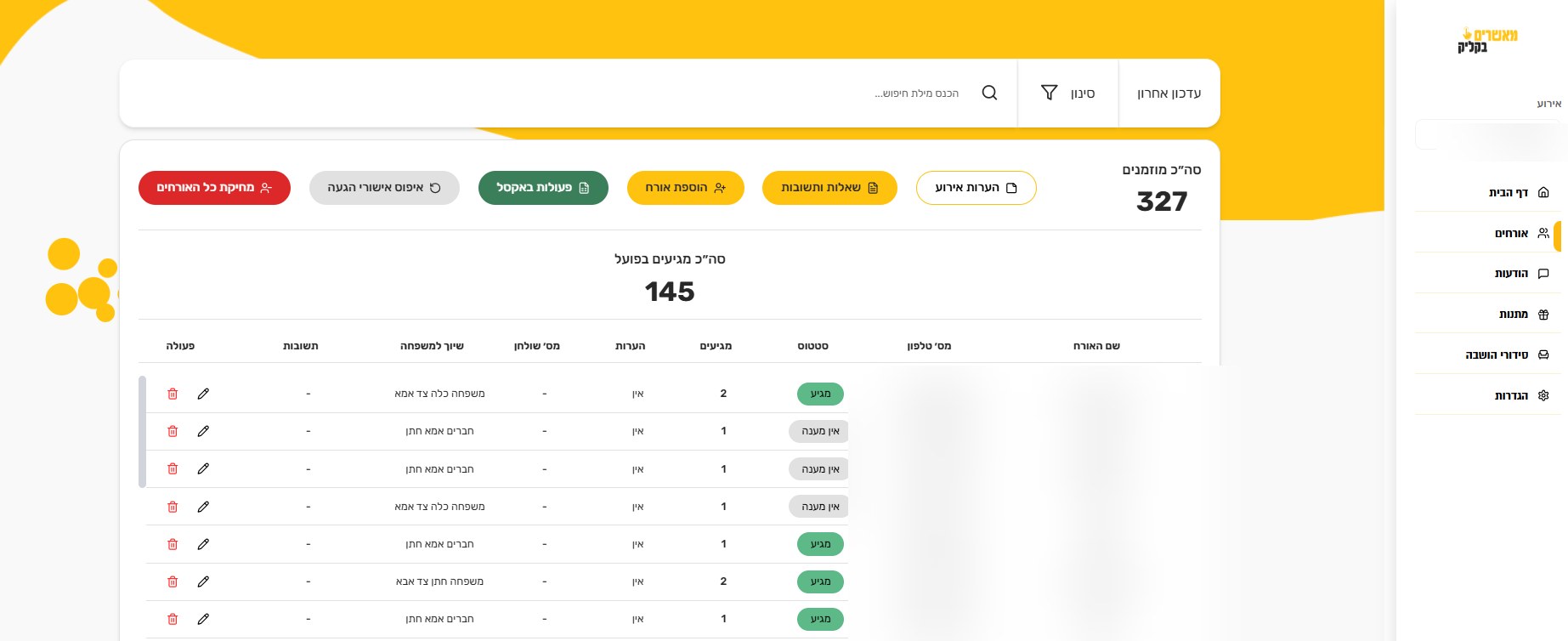
Guest management table with 327 invited
Guest management
327 invited, 145 arriving — status, party size, family grouping and per-guest actions, with search, filters, Excel export and bulk tools.
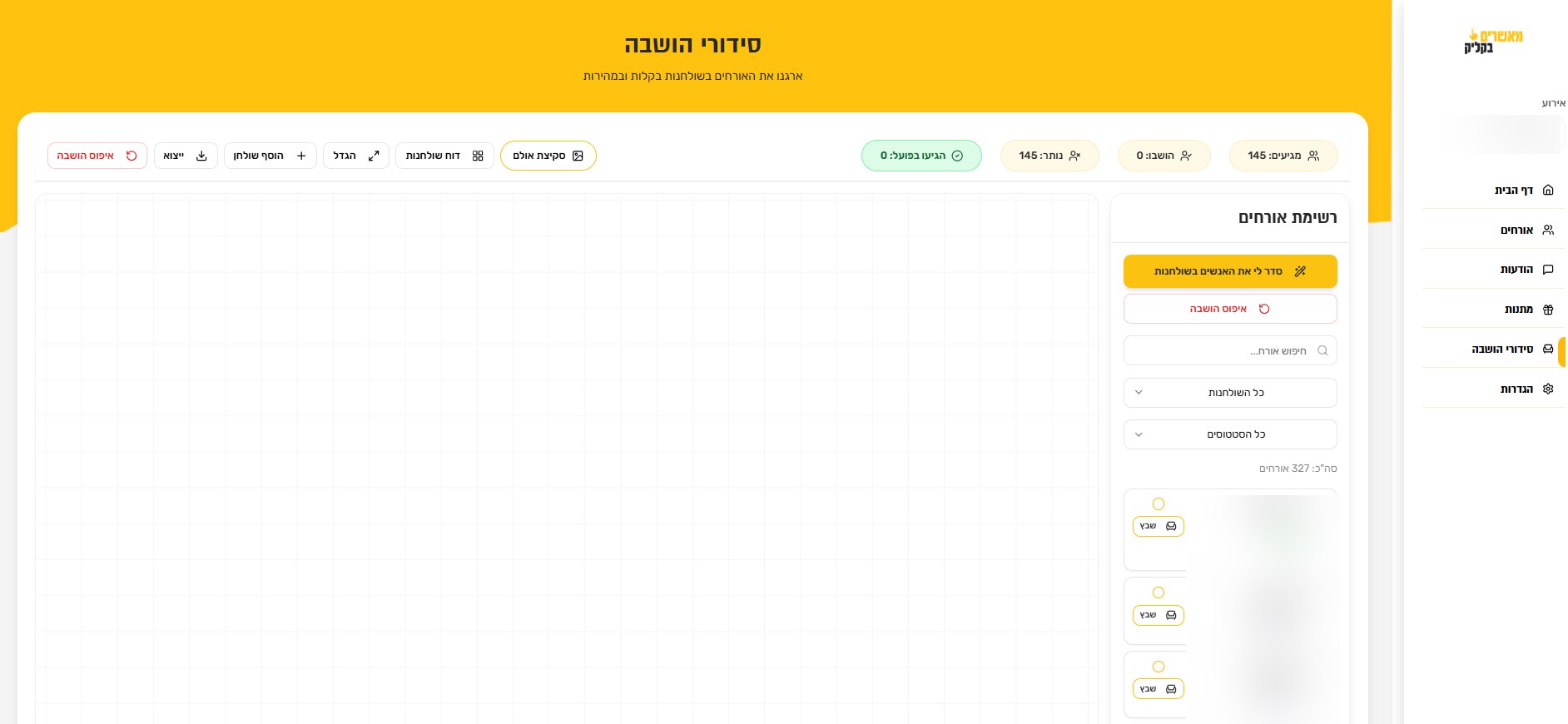
Seating arrangement board
Seating board
Drag guests onto tables — or auto-seat by family — beside the live guest list, table filters and a hall-sketch upload. The seating spec, shipped.

See it in action

A walkthrough of the live product

A short demo of Meashrim in Click — the real, shipped app in use.

0 to 100, solo

How it actually got shipped

1
Characterize
Framed the market and the host's real job. Defined the product, the core flows and what had to be nailed — before any UI.
2
Design
Turned the spec into the full UX/UI — the guest flow, the host dashboard, seating and the admin system.
3
Build with AI
Built the real, working iOS app and web admin using AI tooling — shipping software, not just prototypes.
4
Launch to the App Store
Took it through review and released it publicly — now live at version 1.1 with a 5.0★ rating.
5
Paid acquisition
Ran a paid marketing campaign to bring in real users — leaning on my advertising background to do it efficiently.
6
Monetize & iterate
Introduced a paid subscription, and kept improving the product on feedback from real, paying customers.
This one is real

Not projected — actual traction

My other case studies are concepts. This one isn't: 486 people registered, a 5.0★ App Store rating, and customers paying a subscription — characterized, built, launched and monetized by one person.

486
Registered users
5.0 ★
App Store rating
Paying
Subscription customers

Reflection

What it proves

Building Meashrim in Click end-to-end is how I know product from the inside — not slides, but a thing real people rely on and pay for. It's the clearest evidence of the “0 to 100”.

What's next: deepen retention with sharper reminders and richer seating tools, and expand from weddings to other event types on the same core.

Next project
AI Messaging for Solo Professionals
View project