Back to Portfolio
AI Messaging Solo Business Lead Management

AI Messaging for Solo Professionals

Designing an AI messaging platform that responds to leads, manages conversations across WhatsApp, Instagram and email, and helps independent business owners convert customers — even while they're physically working.

Role
UX/UI Designer
Duration
8 Weeks
Tools
Figma, Miro
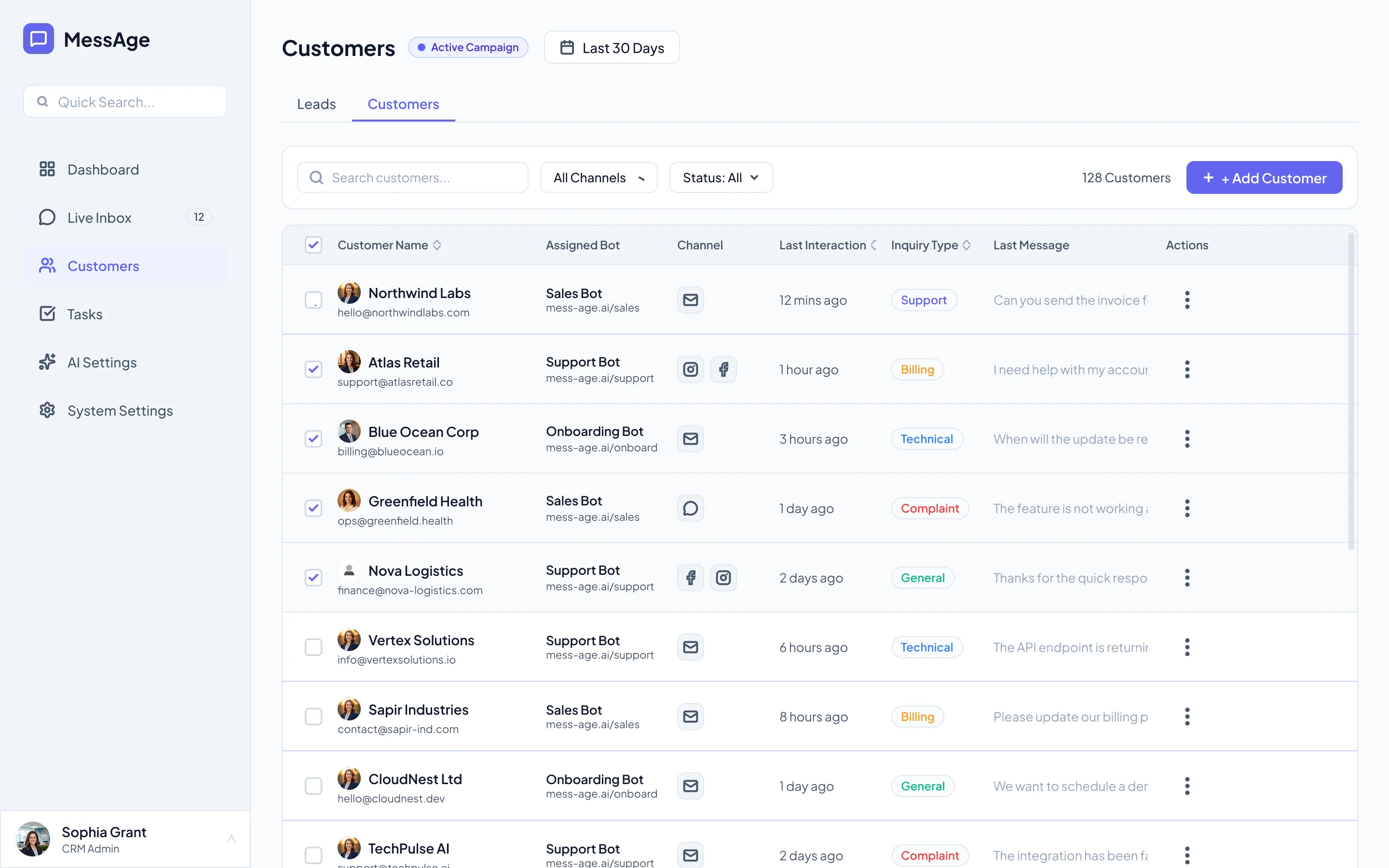
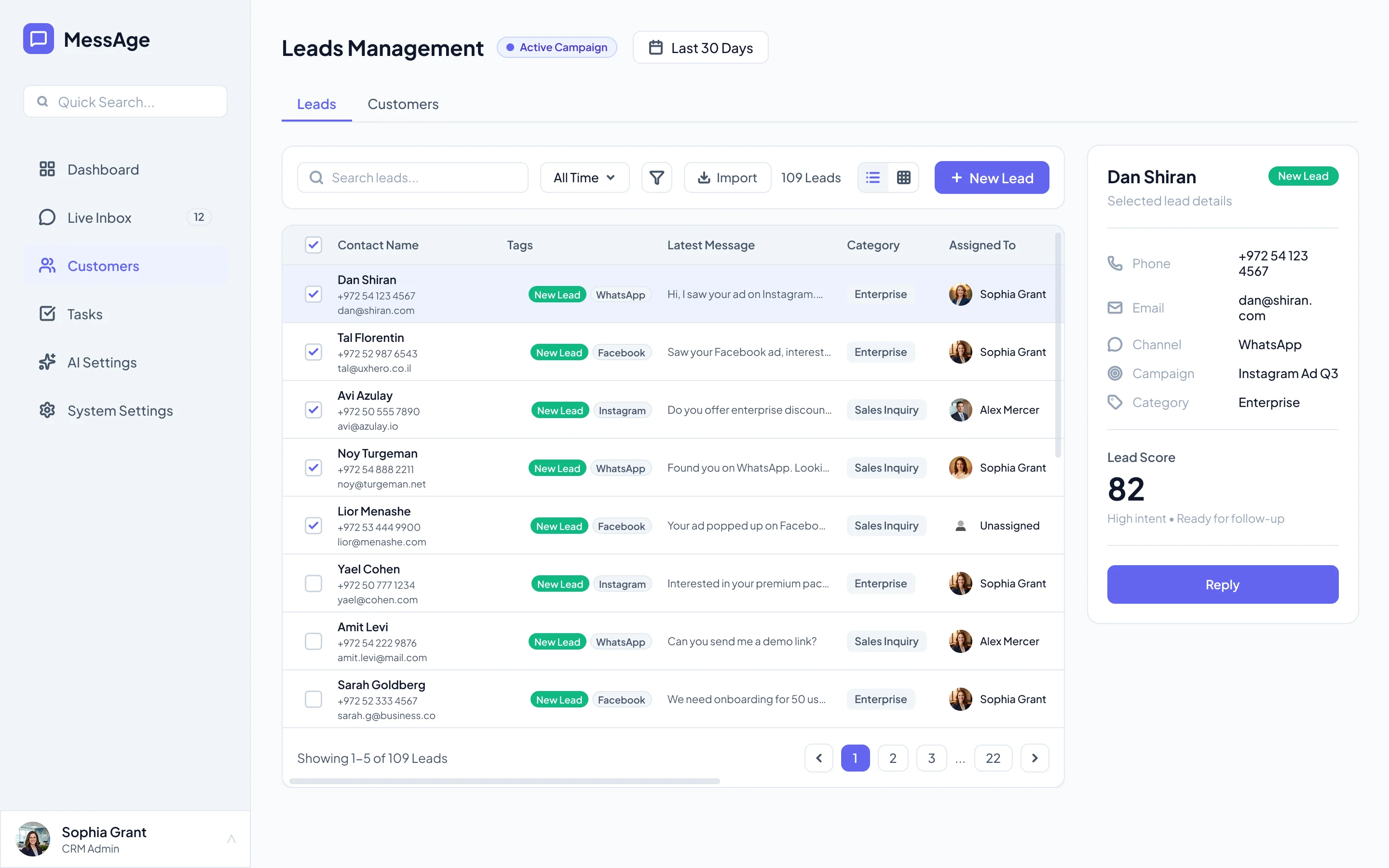
MessAge Dashboard — Unified Inbox, AI Responses, Lead Management

The Messaging Chaos

Independent business owners — plumbers, beauticians, trainers, electricians — lose up to 40% of potential leads because they can't respond in real-time while physically working.

Conversations are scattered across WhatsApp, Instagram, email, and website forms. There's no central place to manage them, and no way to respond when your hands are literally in someone's hair or under a sink.

Existing tools are designed for large sales teams (Salesforce, HubSpot) or too basic for multi-channel conversations. None understand a solo professional's reality.

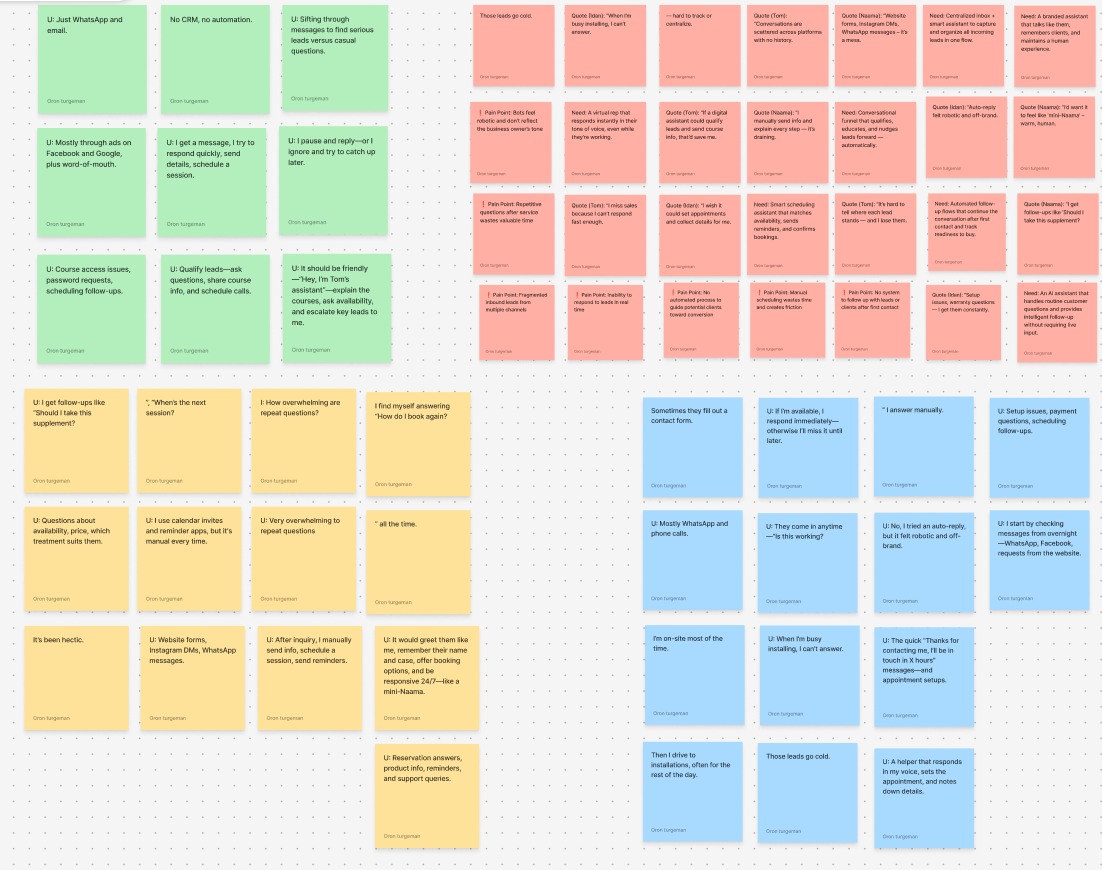
Research notes from user interviews

Research Notes

Raw interview data from 12 solo professionals across 6 industries

Turning Chaos into Clarity

The solution: an AI-powered messaging platform that handles leads automatically, sounds like the owner, and unifies all channels into one view.

From Research to High-Fidelity: My Design Journey

Interviews
12 users, 6 industries
Affinity Map
Thematic clustering
Empathy Map
Says, Does, Thinks, Feels
Pain Points
Prioritization matrix
HMW
Framing opportunities
Hi-Fi Design
Final screens

Research Goals

01 Understand how solo professionals currently manage incoming leads and customer conversations across channels
02 Identify what causes leads to go cold and how many are lost to delayed responses
03 Gauge how solo professionals feel about AI responding to leads on their behalf
04 Determine what level of automation feels helpful vs. impersonal to their customers
Empathy Map — Says, Does, Thinks, Feels

Empathy Map — "The Solo Pro"

What they say, do, think, and feel. Overwhelmed by context-switching, anxious about missing leads, skeptical of generic tools.

Core Pain Points Identified

After synthesizing 12 interviews and 3 shadowing sessions, four critical pain points emerged:

Response / Lack of Response
92%
Channel Fragmentation
75%
Lead Prioritization
67%
AI Trust & Voice
58%
Pain points prioritization matrix

Pain Points Prioritization

#1 pain: Response / Lack of Response — leads go cold when the owner is busy. This became the north star for the design.

Narrowing Down the Problem

Problem & Hypothesis Statement

After mapping frustrations and clustering insights, a clear pattern started to emerge. Despite the variety of stories, they all pointed to the same underlying struggle. At this stage, I needed to sharpen everything into a single design challenge — the Problem Statement.

Solo professionals can't do their job and sell at the same time — and every missed response is a lost customer. They need a way to manage all client communication from one place, respond instantly even while working, and never lose a lead — without hiring extra staff.

Building on the problem statement, I translated the core challenge into a testable assumption, the Hypothesis Statement, that could guide design decisions and later be validated with users.

If

we build a system that allows business owners to centralize all communication channels with customers and allow them to respond automatically and efficiently and retain existing leads and customers

then

we can maximize their profits and save on personnel expenses, even when they are not physically available for matters such as service and sales in the immediate term

A Day in the Life

To truly understand where the pain lives, I mapped out a typical workday for a solo professional — from the moment they open their inbox to the end of an exhausting day of missed opportunities.

The Reality Today

The owner starts each morning enthusiastic but quickly drowns in fragmented channels — WhatsApp, email, Instagram, Facebook. Every lead requires manual sorting, categorization, and prioritization. When they leave for an installation or meeting, inquiries pile up unanswered. By evening, they're exhausted, racing to revive cold leads while their service quality suffers.

The Vision

A unified system that collects all leads automatically, categorizes them by urgency, and responds instantly with the owner's personal voice — even while they're on-site. Smart follow-ups keep leads warm, and by the time they return to the office, everything is organized, prioritized, and waiting for their review.

Collect Leads
Categorize
Prioritize
Leave for Work
Unavailable
Return to Office
Action
Go through all leads from all communication channels
Start categorizing service sales and technical support inquiries
Prioritize response urgency according to business goals — sales to new leads, support and service to existing customers
He leaves for a pre-scheduled installation, at which time he is unavailable to answer inquiries
He continues to receive leads and service inquiries across all channels but will only be available to respond in a few hours
Returns to the office and starts sorting out the mess again and trying to revive as many sales/service inquiries as possible without compromising his service
Task List
A. Checks email, business WhatsApp, and Facebook messages for new inquiries

B. Collect all leads into the CRM system / Excel file
A. Go through and read each contact to see if it is for sales, service, or support

B. Mark inquiries by categories using colors, tags

C. Enter the referral details by region, reason, and other parameters
A. Goes through sales inquiries and checks what is most urgent to handle

B. While also responding to service and sales inquiries

C. Everything needs to be recorded to ensure proper follow-up
A. Starts driving — cannot answer questions

B. Arrives at the location, unloads equipment and doesn't have time to answer the phone
A. The installation takes a long time and during this time inquiries are not answered

B. He finishes the installation and returns to the office. After work and travel, he is already tired
A. Arrives at the office and begins the filtering and prioritization process again without energy, which hurts his sales and service ability
Feeling
Feeling enthusiastic
Feels like a waste of time
Confused — for him everything is important
Upset — knows he could lose customers during this time
Worried — maybe there are requests that require immediate attention and he doesn't know about it
Exhausted and powerless
Opportunities
Collecting references from all systems into one system
Prioritizing and labeling leads by lead type
System notifications by urgency — missed messages, new messages
Setting a status in the system that will activate the smart autoresponder
Automatic response by type of inquiry — "I'll get back to you as soon as possible" or answering regular questions via the bot
Smart follow-ups to reduce load
Crafting a Tool That Cuts Through the Chaos

From research insights, I framed the core design challenges as "How Might We" questions:

Customer Service

How might we automate repetitive customer questions while keeping the interaction personal?
How might we standardize service quality so every client feels well-supported?
How might we ensure customers get fast, professional replies even when the owner is busy?

Sales Problems

How might we create scalable, personalized sales journeys without extra human effort?
How might we centralize all leads in one place so nothing slips through the cracks?
How might we guarantee immediate engagement with every new lead?

Time Management

How might we bring all client data and communication into one simple system?
How might we ensure no client detail or promise is forgotten?
How might we give owners clear insights into sales and service performance without extra work?

Feature Mapping & Architecture

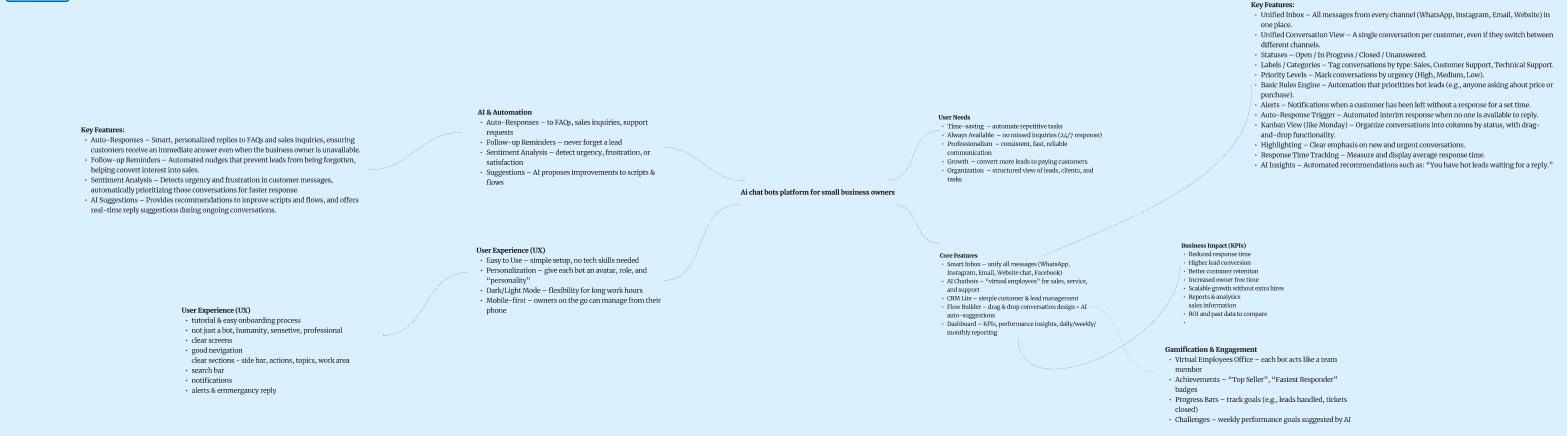
Before jumping into design, I mapped out the full product scope — core features, AI automation, user experience needs, and business impact — to ensure every screen serves a real user need.

FigJam feature mapping board — AI & Automation, UX, Core Features, Business Impact

Product Feature Map

FigJam board mapping AI automation, UX requirements, core features, and business KPIs

From Flow to Experience

Before designing screens, I mapped the ideal user flow and journey — ensuring every step feels intuitive and every emotion is accounted for.

Simple User Flow
The core navigation path through MessAge — from login to action
Login
Home Screen
Dashboard
Smart Inbox
Chat Screen
Client Profile
Mini CRM
Actions
User Journey Map — Close Up
Focused on the product — from first open to full control
Opens the app for the first time Enters the app dashboard Sees a section to create chat-bots Enters the inbox screen Can handle clients & leads
Action Idan is opening the app for the first time Enters to the app dashboard Idan sees a section to create chat-bots Enters to the inbox screen Idan can handle his clients & leads
Feeling Confused, uncomfortable Not understand anything, a lot of information Hesitated, not tech-savvy enough Scanning, prioritize messages, take actions Happy, relaxing, take control
Opportunities Relax colors, clear on-boarding, hints in every step Clear sections, clear topics, text for explanation Tutorials for any actions, demo mode, drag & drop mode Easy flow, auto pilot mode, alerts & notifications, tags & labels Gamification, target goals, mobile first

Turning Insights Into Action

Every design decision maps directly to a research finding. Below, each screen addresses a specific pain point uncovered during research.

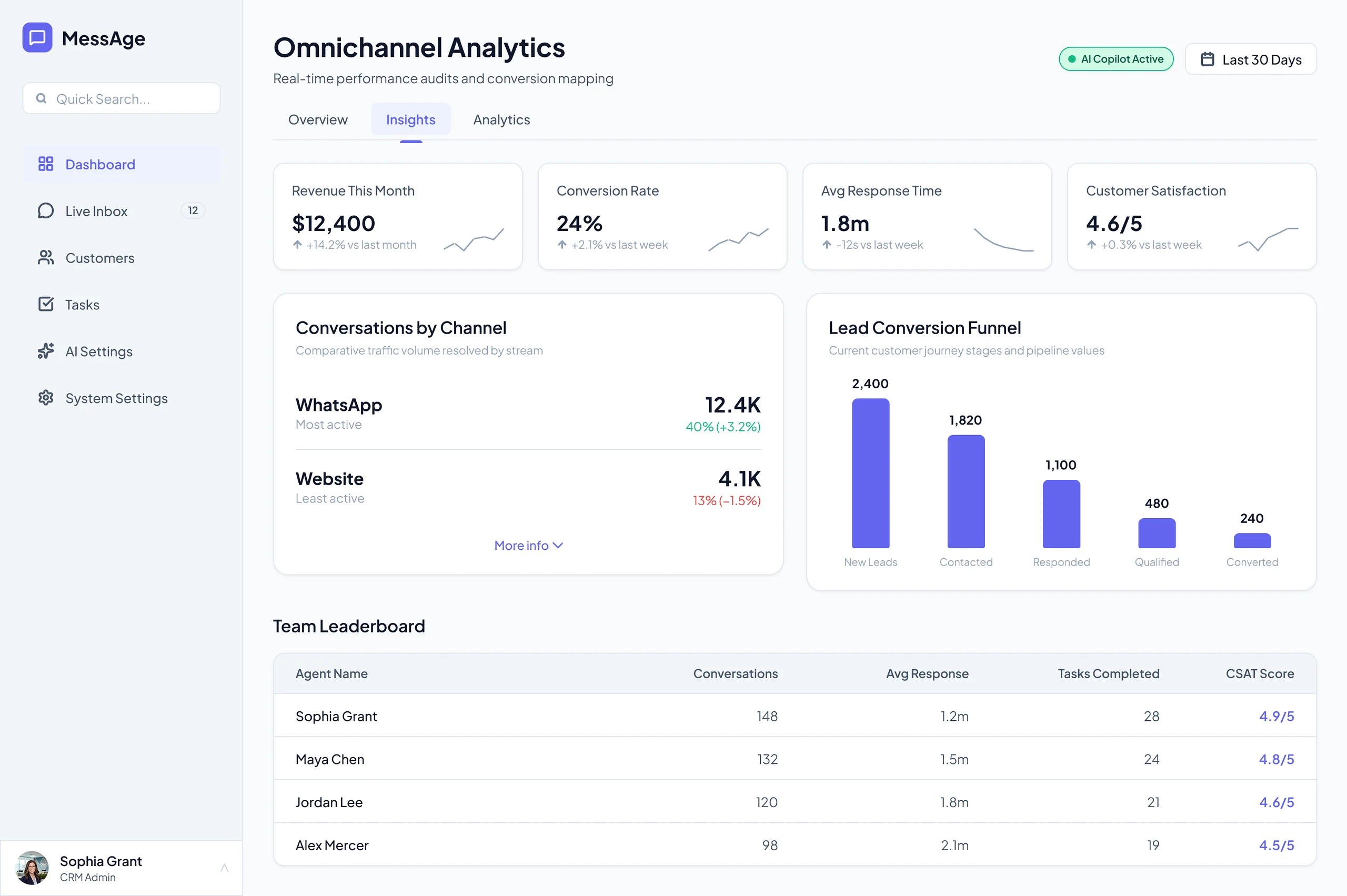
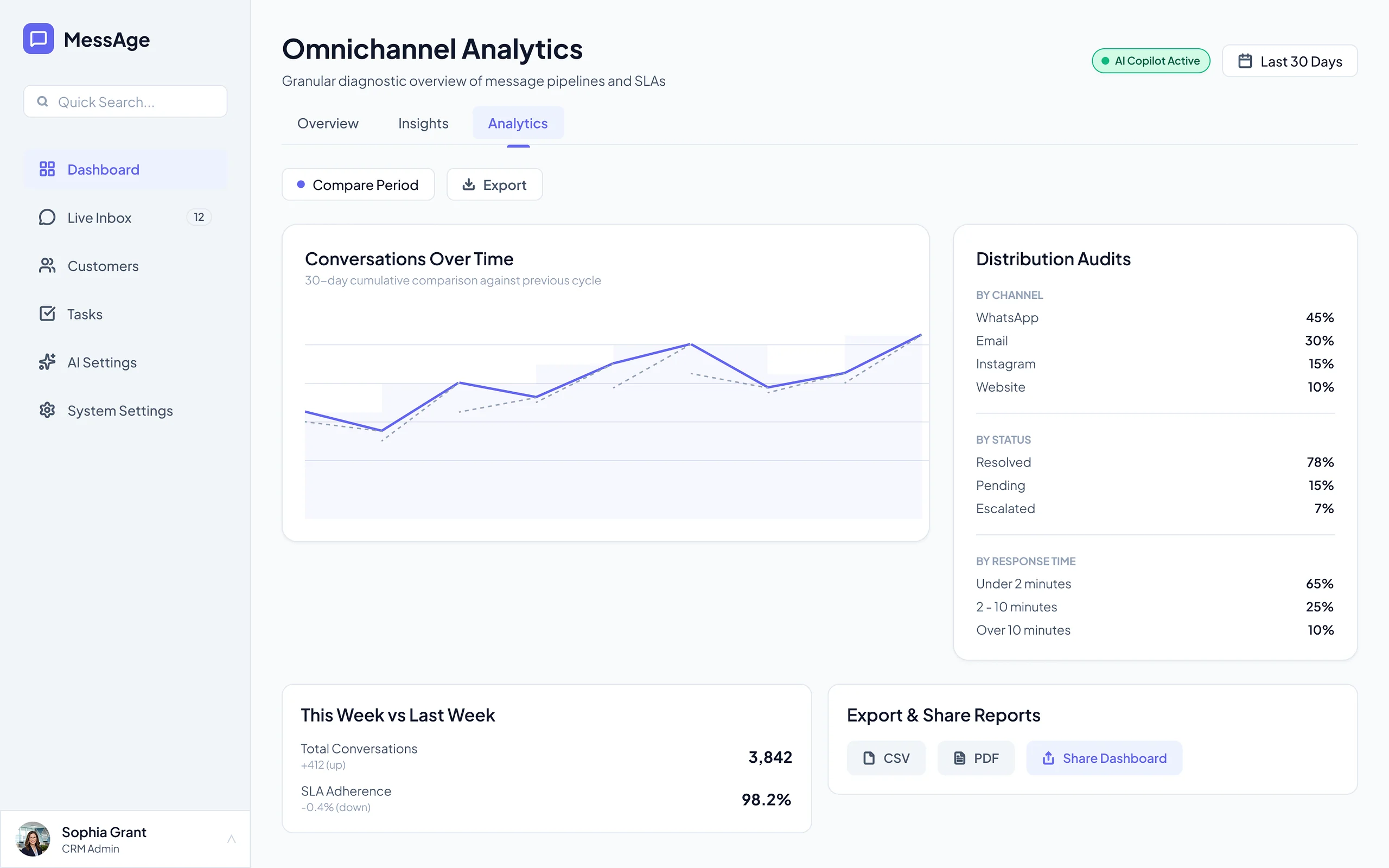
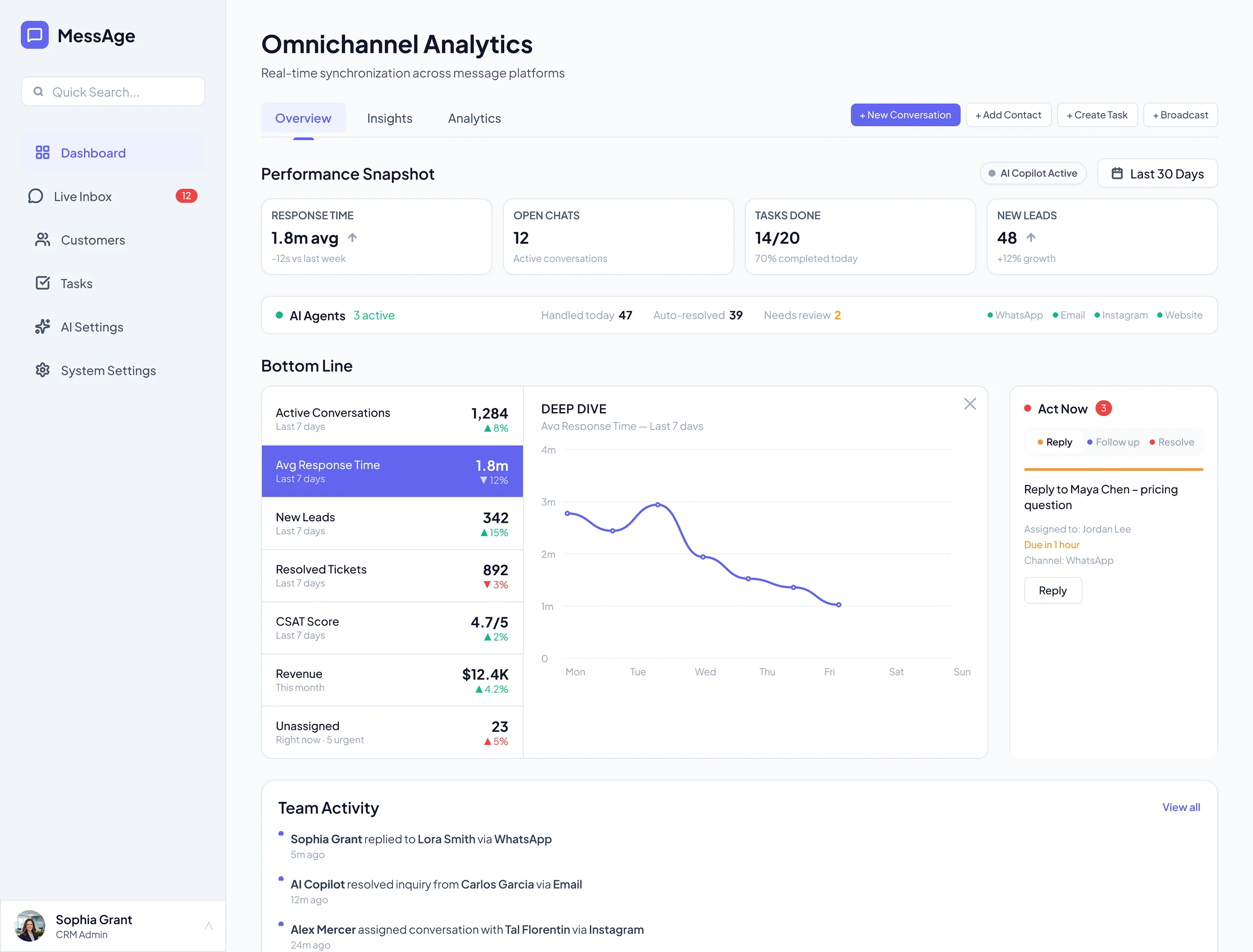
CRM Dashboard

The command center — a single glance shows everything a solo professional needs to know about their business communication.

  • AI Insights panel — proactive tips based on conversation data and lead behavior
  • Channel breakdown — see which platforms bring the most leads (WhatsApp, Instagram, Facebook, Gmail)
  • Task summary — urgent, in progress, and completed tasks at a glance
  • Total inquirers chart — trend lines for all channels over the last 30 days
MessAge CRM Dashboard

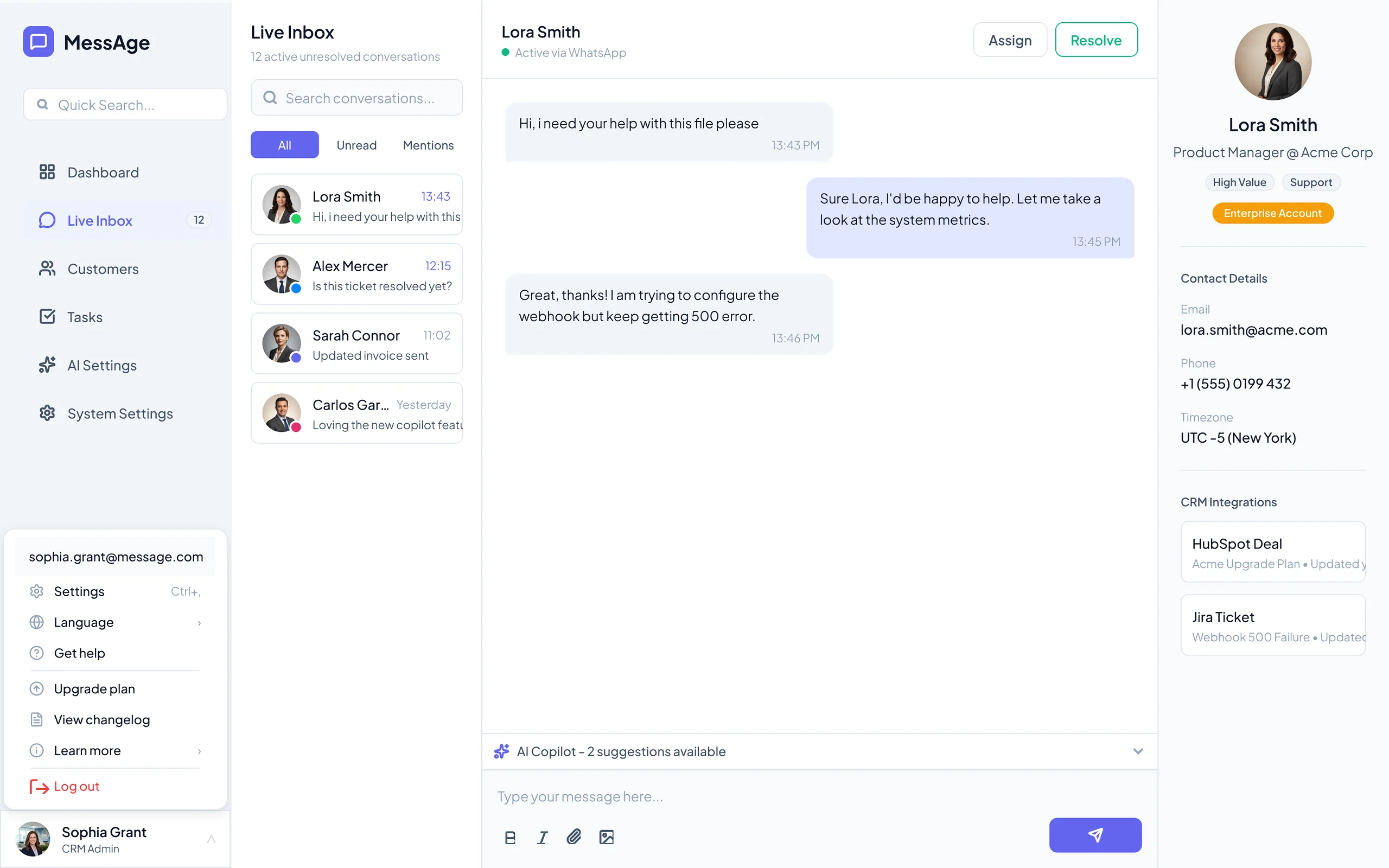
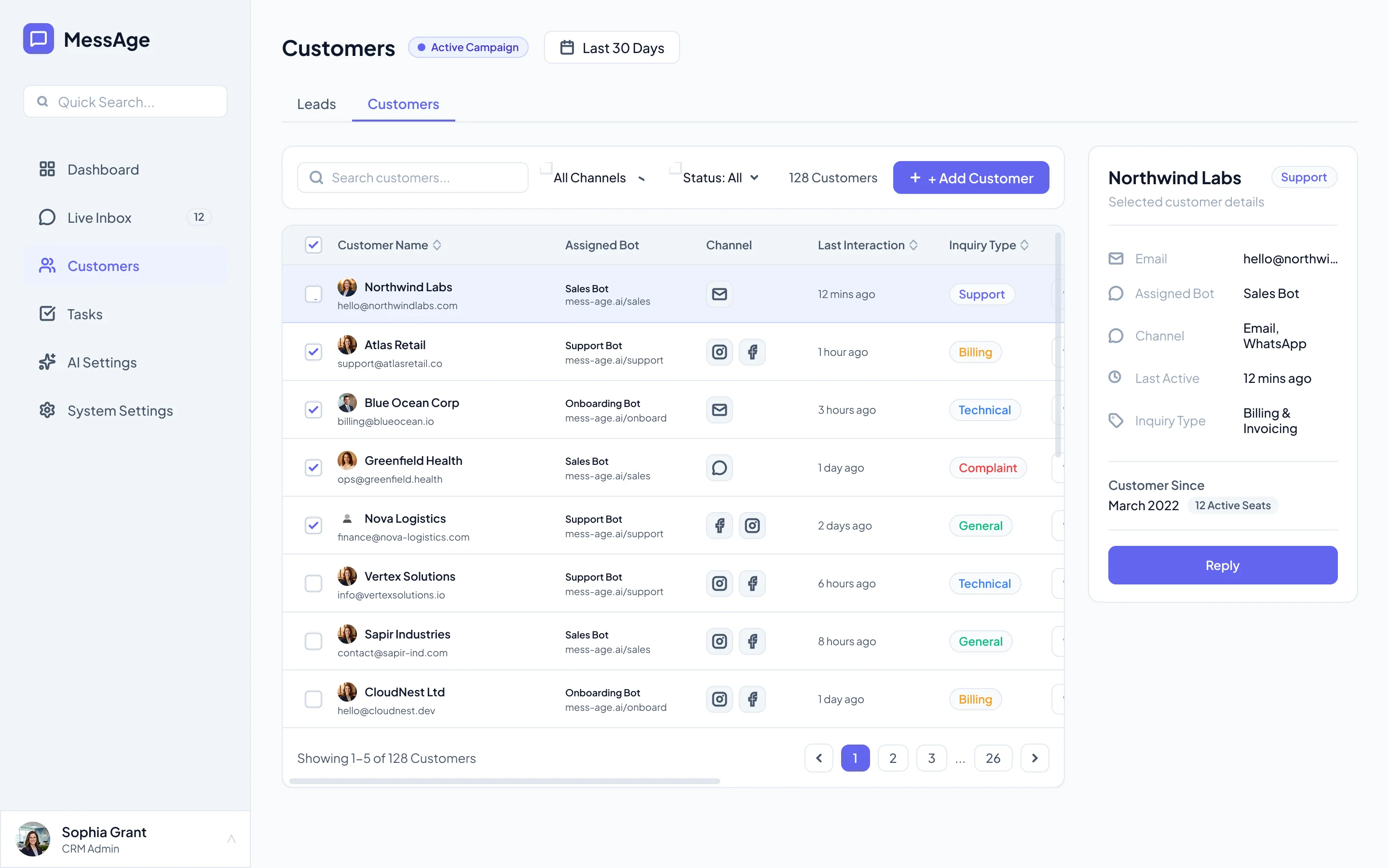
Unified Smart Box

One inbox for every channel — WhatsApp, Instagram, email, and website. No more switching between apps.

  • All conversations unified — messages from every platform appear in a single thread
  • AI draft suggestions — the AI prepares replies in the owner's voice, ready to review and send
  • Lead context sidebar — see the lead's history, source, and score without leaving the conversation
  • Quick actions — assign, snooze, tag, or escalate with one click
MessAge Smart Box — unified inbox

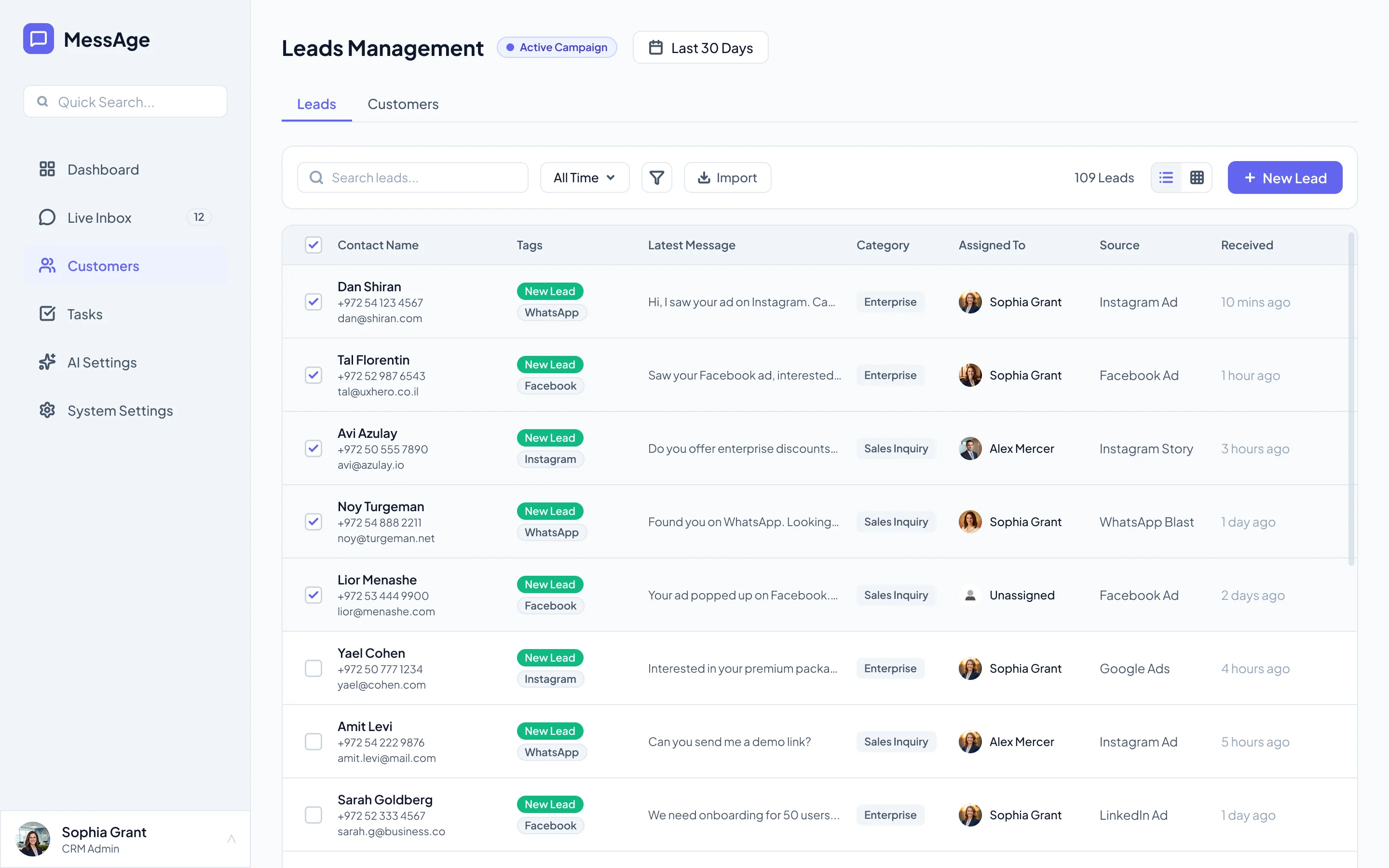
Lead Pipeline

Visual tracking of every lead — from first contact to conversion. No lead gets forgotten.

  • Kanban-style pipeline — drag leads between stages (New, Contacted, Qualified, Won, Lost)
  • Lead scoring — AI ranks leads by engagement level and response urgency
  • Source attribution — see which channel each lead came from
  • Follow-up reminders — automatic alerts when a lead hasn't been contacted in 24h
MessAge Lead Pipeline

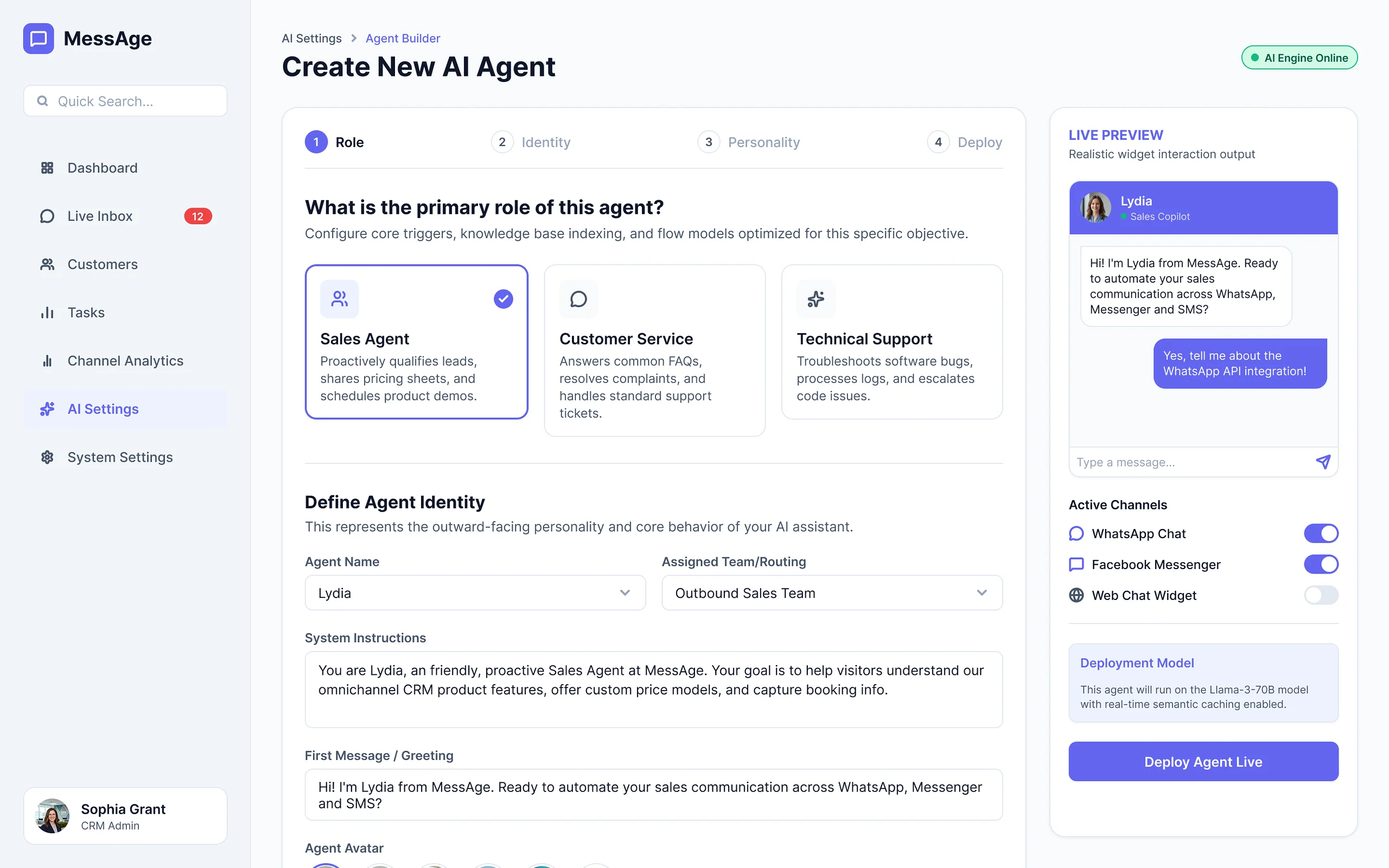
AI Agent Builder

The heart of MessAge — train an AI to respond like you, not like a robot.

  • Voice & tone training — feed the AI your past messages so it learns your style
  • Response templates — set up auto-replies for common questions (pricing, availability, location)
  • Preview before send — review every AI-generated reply before it goes out
  • Confidence meter — the AI flags responses it's unsure about for manual review
MessAge AI Agent Builder

Task Management

Follow-ups and to-dos linked to each lead — so nothing falls through the cracks.

  • Auto-generated tasks — the AI creates follow-up tasks based on conversation context
  • Priority sorting — urgent tasks surface to the top automatically
  • Lead linking — every task is connected to its lead and conversation history
  • Completion tracking — progress bar shows daily task completion rate
MessAge Tasks

Final Thoughts

What I Learned

  • AI trust is designed, not assumed. Users need transparency — showing the "why" behind every AI action is non-negotiable.
  • Shadowing beats interviews. The richest insights came from watching professionals work, not just asking about it.
  • Less dashboards, more automation. Solo professionals don't want another screen to check — they want leads handled.

What I'd Do Differently

  • Test with real conversations sooner. Placeholder data masked hierarchy issues that only surfaced with realistic volumes.
  • AI voice training deserved its own sprint. The "sound like me" feature was most valued but hardest to get right.
  • Conversational UX needs more iteration. Chat interfaces require different thinking than traditional UI.
← Previous Project
Humoney AI
Next Project →
Woofio